Ford Electric Car Infotainment Review Features and User Experience
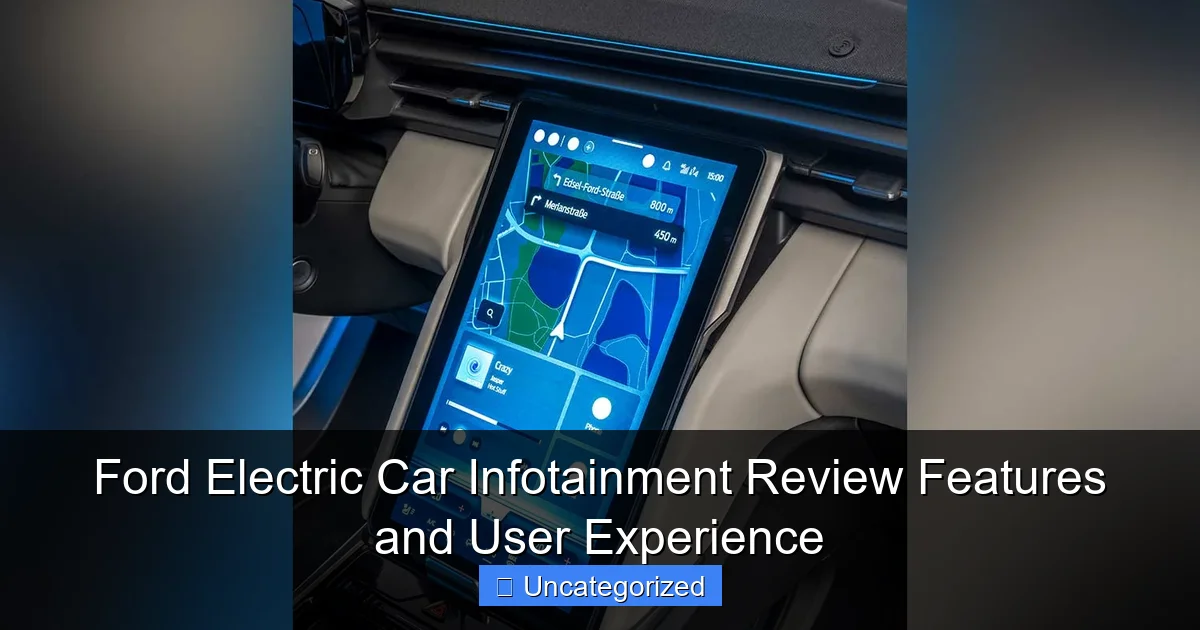
Featured image for ford electric car infotainment
Image source: autobics.com
Ford’s electric car infotainment system delivers a seamless, tech-forward experience with its intuitive SYNC 4A interface, featuring a responsive touchscreen, crisp graphics, and robust voice recognition. Wireless Apple CarPlay, Android Auto, and over-the-air updates enhance convenience, while the available 15.5-inch portrait display sets a new benchmark for in-cabin tech. From real-time navigation to integrated apps, Ford blends functionality with user-centric design to keep drivers connected and in control.
Key Takeaways
- Intuitive interface: Ford’s infotainment system offers seamless navigation and quick access to key features.
- Voice command: Advanced voice recognition simplifies controls while driving, enhancing safety.
- App integration: Smooth compatibility with Apple CarPlay and Android Auto for effortless connectivity.
- OTA updates: Regular over-the-air updates keep the system current without dealership visits.
- Customizable display: Users can personalize screens for faster access to preferred functions.
- Wireless charging: Built-in pad ensures devices stay powered during long drives.
📑 Table of Contents
- The Future of Driving: Ford’s Electric Infotainment Revolution
- 1. The SYNC 4 and SYNC 4A Platforms: Core Features
- 2. Charging and Range Optimization Tools
- 3. Audio and Entertainment Experience
- 4. User Experience and Usability
- 5. Safety and Driver Assistance Integration
- 6. Comparison with Competitors: How Ford Stands Out
- Final Verdict: Is Ford’s Electric Infotainment Worth It?
The Future of Driving: Ford’s Electric Infotainment Revolution
The automotive industry is undergoing a seismic shift, with electric vehicles (EVs) at the forefront of innovation. Among the pioneers in this transition is Ford, a legacy automaker that has seamlessly blended its century-old expertise with cutting-edge technology. While Ford’s electric lineup—including the Mustang Mach-E and F-150 Lightning—has garnered praise for performance and range, one aspect that often flies under the radar is the infotainment system. This digital nerve center is where drivers interact with their vehicles, from navigation to entertainment and vehicle settings. In this review, we’ll dive deep into Ford’s electric car infotainment ecosystem, exploring its features, usability, and how it stacks up against competitors.
Infotainment systems have evolved from simple CD players to sophisticated, AI-driven interfaces. For Ford, the stakes are high: a seamless, intuitive system can elevate the ownership experience, while a clunky one can sour it. The company’s SYNC 4 and SYNC 4A platforms, tailored for its EVs, promise a blend of functionality, connectivity, and personalization. Whether you’re a tech-savvy driver or someone who prefers simplicity, Ford’s infotainment system aims to cater to all. Let’s unpack what makes it stand out—and where it could improve.
1. The SYNC 4 and SYNC 4A Platforms: Core Features
Hardware and Display Design
Ford’s electric vehicles feature large, high-resolution touchscreens, with the Mustang Mach-E offering a 15.5-inch portrait-oriented display and the F-150 Lightning sporting a 12-inch landscape screen. Both are powered by the SYNC 4 or SYNC 4A systems, which leverage a quad-core processor for snappy performance. The screens are designed with anti-glare coatings and responsive touch technology, making them usable even in direct sunlight or with gloves on (a boon for truck owners).

Visual guide about ford electric car infotainment
Image source: s3files.core77.com
One standout feature is the split-screen functionality, which allows drivers to multitask. For example, you can view navigation on the left while controlling music or climate settings on the right. This design reduces the need to switch between menus, keeping your eyes on the road longer. The physical volume knob and climate control buttons below the screen provide tactile feedback, a nod to Ford’s commitment to usability.
Software and User Interface
The SYNC 4/4A interface is clean and modern, with a minimalist design that prioritizes readability. Key features include:
- Customizable home screen: Users can drag and drop widgets (e.g., weather, charging status, favorite apps).
- Voice recognition: Powered by Ford’s partnership with Amazon Alexa, the system responds to natural language commands like “Find nearby charging stations” or “Set the temperature to 72 degrees.”
- Over-the-air (OTA) updates: Unlike older systems, SYNC 4/4A receives regular updates that add new features, fix bugs, and improve performance—no dealership visit required.
- Wireless Apple CarPlay and Android Auto: A rare but welcome feature in EVs, eliminating the need for cables.
Pro tip: To maximize efficiency, enable the “Predictive Destination” feature, which learns your habits and suggests frequent destinations (e.g., home, work) based on time and location.
Connectivity and Cloud Integration
Ford’s infotainment system is deeply integrated with the cloud, enabling real-time traffic updates, weather alerts, and remote vehicle control via the FordPass app. For example, you can precondition your car’s cabin temperature while it’s charging, saving battery range. The system also supports Ford’s Connected Navigation, which provides live charging station availability, route planning for EVs, and estimated range based on traffic and elevation.
However, cloud features require a data connection. While Ford offers a free trial (typically 5 years for SYNC 4A), a subscription is needed afterward. This is a minor gripe, but worth noting for budget-conscious buyers.
2. Charging and Range Optimization Tools
Smart Charging Solutions
One of the most critical aspects of EV infotainment is how it simplifies the charging experience. Ford’s system excels here with:
- Charge Station Locator: The navigation system displays nearby stations, including their connector types (CCS, NACS), pricing, and real-time availability. It even filters results by charging speed (e.g., DC fast charging).
- Route Planning with Charging Stops: For long trips, the system calculates the optimal route, factoring in charging stops, battery drain, and traffic. It can also reserve spots at partnered stations (e.g., Electrify America).
- Charge Time Estimator: Based on your current battery level and the charger’s output, the system estimates how long a charge will take.
Example: Planning a 300-mile trip in the Mustang Mach-E? The system might recommend a 20-minute stop at a 150kW charger to add 150 miles of range, ensuring you arrive with 50% battery remaining.
Energy Management Features
Ford’s infotainment system includes tools to help drivers maximize efficiency:
- Regen Braking Adjustment: Users can toggle between “One-Pedal Driving” (high regen) and “Low Regen” modes via the touchscreen.
- Power Usage Dashboard: A real-time graph shows energy consumption, helping drivers identify inefficiencies (e.g., aggressive acceleration).
- Climate Control Scheduling: Pre-heat or pre-cool the cabin while the car is plugged in to reduce battery drain.
Tip: Use the “Eco Route” option in navigation, which prioritizes energy-efficient paths over the fastest route.
Home Charging Integration
For home charging, the FordPass app syncs with the infotainment system to:
- Monitor charging progress.
- Schedule charging during off-peak hours (to save on electricity costs).
- Receive alerts when charging is complete.
3. Audio and Entertainment Experience
Sound System Options
Ford offers premium audio packages across its EVs, with the B&O Unleashed Sound System as the flagship option. Available on the Mustang Mach-E GT and F-150 Lightning Platinum, this 1080-watt system features 10 speakers, including a subwoofer. The system is tuned for immersive sound, with customizable equalizer settings and noise cancellation.
For audiophiles, the B&O system delivers crisp highs and deep bass, even at highway speeds. However, the standard 6-speaker setup (found in base trims) is adequate for casual listeners, though it lacks the richness of premium options.
Streaming and Media Playback
Ford’s infotainment supports:
- Streaming Apps: Spotify, Amazon Music, and SiriusXM are pre-installed. Netflix and YouTube are available in parked mode (a safety feature).
- Bluetooth Audio: Connect up to two devices simultaneously (e.g., phone and tablet).
- USB and SD Card Playback: For offline music and videos.
Pro tip: Use the “Party Mode” feature (in parked mode) to play music and videos on the screen, transforming your EV into an impromptu entertainment hub.
Voice-Controlled Entertainment
The Alexa integration extends to media control. For instance, saying “Play my ‘Road Trip’ playlist on Spotify” or “Turn on the radio” works flawlessly. The system also supports multi-room audio, allowing you to play music from your home Alexa devices in the car.
4. User Experience and Usability
Learning Curve and Accessibility
Ford’s infotainment system is designed for ease of use, but it’s not without a learning curve. New users may find the split-screen layout and voice commands overwhelming at first. However, the intuitive menu structure and clear icons help mitigate this. Ford provides an in-depth tutorial in the FordPass app, which walks users through key features.
Accessibility features include:
- Text-to-Speech: Reads out messages and navigation prompts.
- High-Contrast Mode: For visually impaired drivers.
- Voice Command Shortcuts: Custom phrases (e.g., “Hey Ford, take me home”) can be programmed.
Common User Complaints
Despite its strengths, Ford’s system has faced criticism for:
- Occasional Lag: Older SYNC 4 units may experience slowdowns during multitasking.
- Voice Recognition Errors: Accents or background noise can confuse Alexa.
- Subscription Costs: Some cloud features require paid plans after the trial period.
Tip: Restart the system (hold the power button for 10 seconds) to resolve minor glitches.
Personalization and Profiles
Ford allows up to four user profiles, each with saved preferences for:
- Seat and mirror positions.
- Climate settings.
- Favorite apps and widgets.
Profiles sync automatically when you unlock the car via the FordPass key fob or app.
5. Safety and Driver Assistance Integration
Advanced Driver Aids
Ford’s infotainment system is tightly integrated with its Co-Pilot360 suite of driver aids, including:
- Adaptive Cruise Control: Adjusted via touchscreen or steering wheel controls.
- Lane-Keeping Assist: Visual and audio alerts appear on the screen.
- 360-Degree Camera: The display shows a bird’s-eye view of the car, with dynamic guidelines.
The system also provides real-time feedback on driving behavior, such as sudden braking or sharp turns, encouraging safer habits.
Emergency Services and Alerts
In the event of a collision, the infotainment system automatically contacts emergency services. It also sends alerts for:
- Low tire pressure.
- Battery health issues.
- Software update reminders.
Data Privacy and Security
Ford emphasizes data privacy with:
- Encrypted Connections: All cloud data is AES-256 encrypted.
- User-Controlled Data Sharing: Opt in/out of features like location tracking.
- Regular Security Patches: Delivered via OTA updates.
6. Comparison with Competitors: How Ford Stands Out
To gauge Ford’s infotainment system, let’s compare it to key rivals:
| Feature | Ford SYNC 4A | Tesla Model Y | Chevy Bolt EUV | Hyundai Ioniq 5 |
|---|---|---|---|---|
| Screen Size | 15.5″ (Mach-E) | 15″ | 10.2″ | 12.3″ |
| Wireless CarPlay/Android Auto | Yes | No | Yes | Yes |
| OTA Updates | Yes | Yes | No | Yes |
| Voice Assistant | Alexa | Custom | Google Assistant | Google Assistant |
| Charging Route Planning | Yes | Yes | Limited | Yes |
| Subscription Required | Some features | None | None | None |
Ford’s system shines in wireless connectivity and charging integration, but lags behind Tesla in AI features (e.g., predictive navigation) and Hyundai in voice assistant versatility. The subscription model is a trade-off for Ford’s robust cloud services.
Final Verdict: Is Ford’s Electric Infotainment Worth It?
Ford’s electric car infotainment system is a compelling blend of innovation and practicality. The SYNC 4/4A platforms deliver a user-friendly interface, robust charging tools, and seamless connectivity—all tailored for EV ownership. While not perfect, its strengths outweigh its flaws, making it one of the better systems in the EV market. For drivers prioritizing ease of use, charging convenience, and Ford’s legacy of reliability, the infotainment system is a standout feature. As Ford continues to refine its software with OTA updates, the future looks even brighter. Whether you’re navigating city streets or embarking on a cross-country adventure, Ford’s infotainment system ensures you stay connected, informed, and entertained—every mile of the way.
Frequently Asked Questions
What infotainment features does the Ford electric car offer?
Ford electric cars come equipped with the SYNC 4A infotainment system, featuring a large touchscreen (12″ or 15.5″), wireless Apple CarPlay/Android Auto, over-the-air updates, and cloud-connected navigation. Many models also include a premium B&O sound system and voice-activated controls for hands-free operation.
How user-friendly is the Ford electric car infotainment system?
The SYNC 4A system prioritizes ease of use with intuitive menus, crisp graphics, and customizable home screens. Most users report quick learning curves, though some note minor lag during multitasking or complex voice commands.
Does Ford’s infotainment system support over-the-air updates for electric cars?
Yes, Ford’s infotainment system delivers over-the-air (OTA) updates for both software enhancements and new features, ensuring your electric car stays current. These updates are free and can be scheduled during off-peak hours to minimize inconvenience.
Can I control Ford electric car infotainment without touching the screen?
Absolutely. The system supports voice commands via the “Hey Ford” wake phrase, allowing control of navigation, climate, music, and phone functions. Physical buttons on the steering wheel provide additional tactile access for common actions.
Is the Ford infotainment system compatible with my smartphone?
Ford’s electric car infotainment supports wireless Apple CarPlay and Android Auto for seamless smartphone integration. You can also use the FordPass app for remote vehicle controls, including climate pre-conditioning and charging management.
How does Ford’s electric car infotainment compare to Tesla’s?
While Tesla focuses on minimalist design and gaming features, Ford’s infotainment balances functionality with familiarity, offering split-screen multitasking and better physical button integration. Both support OTA updates, but Ford edges ahead in smartphone connectivity options.