How to Charge a Nissan Leaf Electric Car Easily and Efficiently

Featured image for how to charge a nissan leaf electric car
Image source: assets-global.website-files.com
Charging your Nissan Leaf is simple and efficient using a Level 2 home charger, which delivers a full charge in 4–8 hours. For faster top-ups, utilize public DC fast chargers (available at many Nissan dealerships) to gain up to 80% charge in just 30–40 minutes. Always monitor charging status via the NissanConnect app to optimize timing and energy use.
Key Takeaways
- Use Level 2 chargers for fastest home charging (7-8 hours).
- Plan DC fast charging for long trips, but limit to 80% battery.
- Schedule off-peak charging to save on electricity costs overnight.
- Always carry a portable charger for emergency Level 1 charging.
- Precondition the battery in cold weather for faster, efficient charging.
- Monitor via NissanConnect app to track charging status remotely.
📑 Table of Contents
Understanding the Basics of Charging Your Nissan Leaf
Why Charging Knowledge Matters for Nissan Leaf Owners
Owning a Nissan Leaf means embracing the future of sustainable transportation, but to truly enjoy the benefits of electric mobility, you need to master the art of charging. Unlike traditional gas-powered vehicles, the Nissan Leaf relies entirely on electricity to power its motor, making charging a critical part of your daily routine. Whether you’re a first-time EV owner or upgrading to a newer Leaf model, understanding how to charge your car efficiently ensures you spend less time waiting and more time driving. From home setups to public charging stations, this guide walks you through every step of the process, ensuring you can charge your Nissan Leaf with confidence and ease.
Charging your Leaf isn’t just about plugging in and walking away—it’s about optimizing your habits, choosing the right equipment, and leveraging technology to save time and money. With the global shift toward electric vehicles accelerating, Nissan has equipped the Leaf with flexible charging options that cater to different lifestyles. This guide will explore everything from plug types and charging speeds to smart scheduling and cost-saving strategies. By the end, you’ll have a clear roadmap to charge your Nissan Leaf easily and efficiently, no matter where life takes you.
Key Components of the Nissan Leaf Charging System
Before diving into the how-to, it’s essential to understand the core components that make up your Leaf’s charging system:
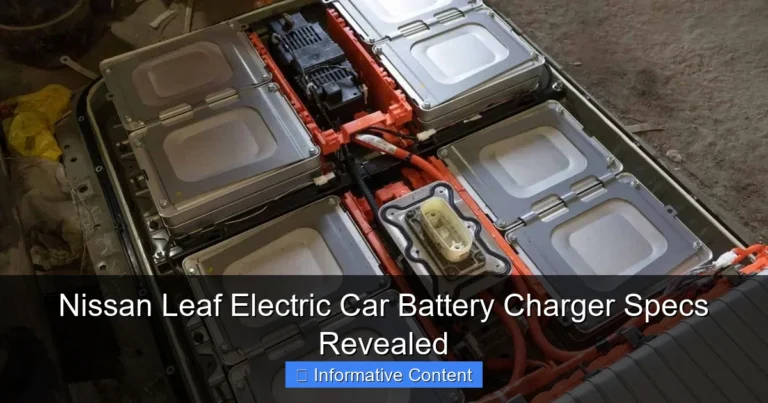
- Onboard Charger: This device converts AC power from the grid into DC power used by your battery. The Leaf’s onboard charger capacity varies by model year and trim level (3.3 kW, 6.6 kW, or 7.2 kW).
- Charge Port: Located on the front fender of all Leaf models, this standardized port accepts both Level 1 and Level 2 connectors. The 2023+ models also support DC fast charging (CHAdeMO).
- Charging Cable (EVSE): Comes standard with every Leaf. It’s a portable charging unit with a J1772 connector on one end and a standard household plug (NEMA 5-15) on the other for Level 1 charging.
- Battery Management System (BMS): Monitors charging rates, temperature, and battery health to prevent overcharging and optimize longevity.
Understanding these components helps you troubleshoot issues and make informed decisions about upgrades or accessories. For example, knowing your onboard charger’s capacity (e.g., 6.6 kW) lets you calculate how long a Level 2 charge will take to reach 80%.
Choosing the Right Charging Equipment
Level 1 Charging: The Built-In Solution
Every Nissan Leaf comes with a Level 1 charging cable that plugs into a standard 120-volt household outlet. This is the most accessible option for new EV owners, especially if you’re testing the waters before investing in upgrades. However, it’s also the slowest method, adding about 4-5 miles of range per hour of charging. For context, a full charge on a 40 kWh Leaf battery could take 20+ hours using Level 1.
Visual guide about how to charge a nissan leaf electric car
Image source: theknotsmanual.com
- Best for: Overnight charging in a pinch, emergency top-ups, or drivers with very low daily mileage (under 20 miles).
- Pros: No installation required, universally available, and included with the vehicle.
- Cons: Extremely slow, not ideal for daily use with longer commutes.
Pro Tip: Always use a dedicated outlet (not shared with other high-draw appliances) and avoid extension cords to prevent overheating. If you must use one, choose a heavy-duty, 14-gauge or thicker cord.
Level 2 Charging: The Smart Upgrade
For most Leaf owners, Level 2 charging is the sweet spot. It uses a 240-volt circuit (like a dryer or oven outlet) and delivers 3.3 kW to 7.2 kW of power, depending on your charger and Leaf model. This cuts charging time dramatically—adding 25-40 miles of range per hour. A 6.6 kW Level 2 charger can fully recharge a 40 kWh Leaf in 6-7 hours.
- Installation Options:
- Hardwired Station: Permanently installed in your garage. Requires an electrician but offers cleaner aesthetics and often higher power output (e.g., 7.2 kW).
- Plug-In Station: Uses a NEMA 14-50 outlet (like a RV plug). Easier to install and portable if you move.
- Recommended Models:
- Wallbox Pulsar Plus: 40A, 9.6 kW (future-proof for higher-capacity batteries)
- ChargePoint Home Flex: 50A, 12 kW, with app scheduling and usage tracking
- JuiceBox 40: 40A, 9.6 kW, with Wi-Fi connectivity and Alexa integration
Cost-Saving Tip: Many utility companies offer rebates for Level 2 charger installations. Check your local provider’s website for programs that could cover 50-100% of the cost.
DC Fast Charging (CHAdeMO): For Long Trips
For road trips or quick top-ups, the Nissan Leaf supports DC fast charging via the CHAdeMO standard (standard on 2018+ models). These public stations bypass the onboard charger, delivering DC power directly to the battery at rates up to 50 kW (Leaf Plus models can reach 100 kW). This can add 80-100 miles of range in just 30 minutes.
- Where to Find: Use apps like PlugShare, ChargePoint, or NissanConnect to locate nearby stations. Major networks include EVgo, Electrify America, and ChargePoint.
- Best Practices:
- Limit fast charging to 80% to reduce battery stress.
- Precondition the battery (via app) while plugged into a Level 2 charger to maximize fast-charge speed.
- Use during off-peak hours to avoid congestion and higher rates.
Note: Frequent fast charging may slightly reduce long-term battery health. Use it strategically—not for daily charging.
Step-by-Step Charging Process
Preparing Your Vehicle for Charging
Before plugging in, follow these steps to ensure safety and efficiency:
- Park Safely: Position your Leaf close to the charger with the charge port accessible. Avoid stretching the cable across walkways.
- Check the Charge Port: Remove the cover and inspect for debris or moisture. The Leaf has a locking mechanism—press the charge port button to unlock.
- Review Battery Status: Use the NissanConnect app or dashboard to check your current state of charge (SOC) and estimated range.
- Precondition the Battery (Optional): In cold weather, use the app to warm the battery while plugged in. This improves charging speed and efficiency.
Pro Tip: If using a public Level 2 or DC station, start the session via the network’s app or RFID card to avoid billing errors.
Connecting and Starting the Charge
The actual connection process is straightforward:
- Insert the Connector: Firmly push the J1772 plug (Level 1/2) or CHAdeMO plug (DC) into the charge port until you hear a click.
- Wait for Confirmation: The Leaf will chime, and the charging light (blue LED) will flash. The dashboard will display “Charging” status.
- Lock the Vehicle (Optional): Press the charge port button again to lock the connector. This prevents tampering at public stations.
- Monitor the Session: Use the NissanConnect app to track charging speed, time remaining, and energy added.
Example: A 2023 Leaf SV Plus (62 kWh battery) at 30% SOC plugged into a 7.2 kW Level 2 charger will show ~8 hours to 100% or ~4.5 hours to 80%.
Stopping and Disconnecting Safely
When charging is complete:
- Unlock the Port: Press the charge port button (if locked) or use the NissanConnect app to release the connector.
- Remove the Plug: Grasp the handle (not the cable) and pull straight out.
- Store the Cable: Coil the cable neatly in your trunk or hang it on a wall-mounted hook to prevent tripping hazards.
- Check for Damage: Inspect the connector and cable for wear, especially after using public stations.
Warning: Never force a connector in or out. If stuck, check for mechanical locks or consult your owner’s manual.
Optimizing Charging for Efficiency and Battery Health
Smart Scheduling with NissanConnect
The NissanConnect app is a powerful tool for optimizing charging. Use these features:
- Delayed Charging: Set start/end times to charge during off-peak electricity rates (e.g., 11 PM to 7 AM). This can cut costs by 30-50%.
- Charge Limit: Cap SOC at 80% for daily use. This reduces battery degradation and extends lifespan.
- Preconditioning: Schedule cabin and battery heating/cooling while charging to avoid using battery power later.
- Energy Tracking: Monitor kWh used, cost per charge, and carbon savings.
Example: A Leaf owner in California sets delayed charging from 9 PM to 6 AM (off-peak rate: $0.18/kWh vs. $0.45/kWh peak). Charging a 40 kWh battery to 80% costs $5.76 instead of $14.40.
Maximizing Battery Longevity
To keep your Leaf’s battery healthy for years:
- Daily Charging: Aim for 20-80% SOC for regular use. Reserve 100% for long trips.
- Temperature Management: Avoid charging in extreme heat (>95°F) or cold (<32°F). Use preconditioning to moderate battery temperature.
- Fast Charging Frequency: Limit to 1-2 times per week. Overuse can accelerate capacity loss.
- Software Updates: Keep your Leaf updated via NissanConnect. Updates often include battery management improvements.
Data Point: Nissan’s warranty covers battery capacity loss below 70% for 8 years/100,000 miles. Proper charging habits can help you stay above 80% even after 100,000 miles.
Public Charging and Road Trip Planning
Navigating Public Charging Networks
Public charging requires strategy. Here’s how to use networks effectively:
- Network Selection:
- ChargePoint: Best for Level 2; widespread in urban areas.
- EVgo: Reliable DC fast charging; good for interstates.
- Electrify America: High-power DC (up to 350 kW); ideal for Leaf Plus models.
- Cost Comparison:
Network Level 2 Rate (per kWh) DC Fast Rate (per kWh) Membership Options ChargePoint $0.30–$0.60 $0.45–$0.75 Pay-per-use or $5/month EVgo $0.35–$0.70 $0.55–$0.90 $7.99/month for 20% discount Electrify America Not offered $0.43–$0.69 $4/month for $0.31/kWh - Payment Methods: Most networks accept credit cards, RFID cards, or app-based payments. Nissan Leaf owners get 3 years of free charging on Electrify America (2023+ models).
Pro Tip: Use PlugShare to filter stations by connector type (J1772, CHAdeMO) and check real-time availability.
Road Trip Charging Strategies
For long-distance travel in a Leaf:
- Plan Stops: Use A Better Routeplanner (ABRP) to map DC fast charging stations along your route. Aim for 15-20% SOC before each stop.
- Maximize Efficiency: Drive at 65-70 mph (optimal for Leaf’s efficiency), use cruise control, and minimize A/C use.
- Lunch Break Charging: Combine DC fast charging with meals. A 30-minute stop can add 80+ miles.
- Backup Plans: Identify alternate stations in case of outages. Keep a portable Level 2 cable in your trunk for emergencies.
Example Route: Los Angeles to San Francisco (380 miles). A Leaf Plus (212-mile range) would need 1-2 DC stops. Plan for a 20-minute charge in Bakersfield and a 15-minute top-up in San Jose.
Troubleshooting Common Charging Issues
Diagnosing Charging Failures
If your Leaf won’t charge, check these common causes:
- No Power: Ensure the outlet is working (test with another device) and the circuit breaker is on.
- Connector Not Locking: Clean the charge port and connector. Try a different station.
- Slow Charging: Check for error codes (e.g., “Charging Interrupted”). Verify the station’s output matches your Leaf’s capability.
- App Disconnects: Restart the NissanConnect app and check your phone’s Bluetooth/Wi-Fi.
Quick Fix: If a Level 1/2 charger isn’t working, unplug and wait 30 seconds before reconnecting. For DC issues, try a different stall at the same station.
When to Contact Nissan Support
Seek professional help if:
- Dashboard shows “Charging System Fault” or “Service EV System.”
- Charging stops repeatedly at the same SOC.
- The charge port or connector shows physical damage.
Note: Nissan offers roadside assistance for charging-related issues. Call 1-877-664-2738 (US) or use the NissanConnect app for 24/7 support.
Conclusion
Charging your Nissan Leaf doesn’t have to be complicated. By understanding the different levels of charging, choosing the right equipment, and leveraging smart technology, you can keep your Leaf powered up with minimal effort. Whether you’re charging at home with a Level 2 station, grabbing a quick boost at a DC fast charger, or planning a cross-country adventure, the key is to plan ahead, optimize for efficiency, and prioritize battery health. Remember, every charge is an opportunity to save money, reduce emissions, and enjoy the quiet, responsive driving experience that makes the Leaf special.
As EV infrastructure continues to expand and battery technology improves, the future of charging will only get easier. Stay informed, experiment with different strategies, and don’t hesitate to reach out to Nissan’s support network when needed. With these tips, you’re not just charging a car—you’re embracing a smarter, cleaner way to move through the world. Now plug in, power up, and drive forward with confidence!
Frequently Asked Questions
How do I charge a Nissan Leaf at home?
You can charge your Nissan Leaf at home using a standard 120V Level 1 charger (included with the car) or upgrade to a 240V Level 2 charger for faster charging. A Level 2 charger typically replenishes the battery in 8–12 hours, depending on the model and battery size.
What type of charging stations work with the Nissan Leaf?
The Nissan Leaf uses a CHAdeMO connector for DC fast charging and a J1772 (Type 1) connector for Level 1 and Level 2 charging. Most public charging stations support these standards, making it easy to charge your Leaf on the go.
How long does it take to charge a Nissan Leaf fully?
Charging time varies by method: Level 1 (120V) takes 20–30 hours, Level 2 (240V) takes 8–12 hours, and DC fast charging can reach 80% in about 40 minutes. The exact time depends on your Leaf’s battery capacity and charger power.
Can I use a Tesla charger to charge my Nissan Leaf?
No, the Nissan Leaf is not compatible with Tesla’s proprietary Supercharger network without an adapter. However, you can use Tesla Destination Chargers (J1772 connectors) with a Tesla-to-J1772 adapter for Level 2 charging.
How do I find public charging stations for my Nissan Leaf?
Use apps like PlugShare, ChargePoint, or the NissanConnect EV app to locate nearby charging stations, including Level 2 and DC fast chargers. These apps often include real-time availability, pricing, and user reviews to help you charge efficiently.
Is it safe to charge my Nissan Leaf in the rain?
Yes, charging your Nissan Leaf in the rain is completely safe. The car and charging equipment are designed with weatherproof seals and safety features to prevent electrical hazards during wet conditions.