Nissan Electric Car Route Planner Maximize Your EV Journey
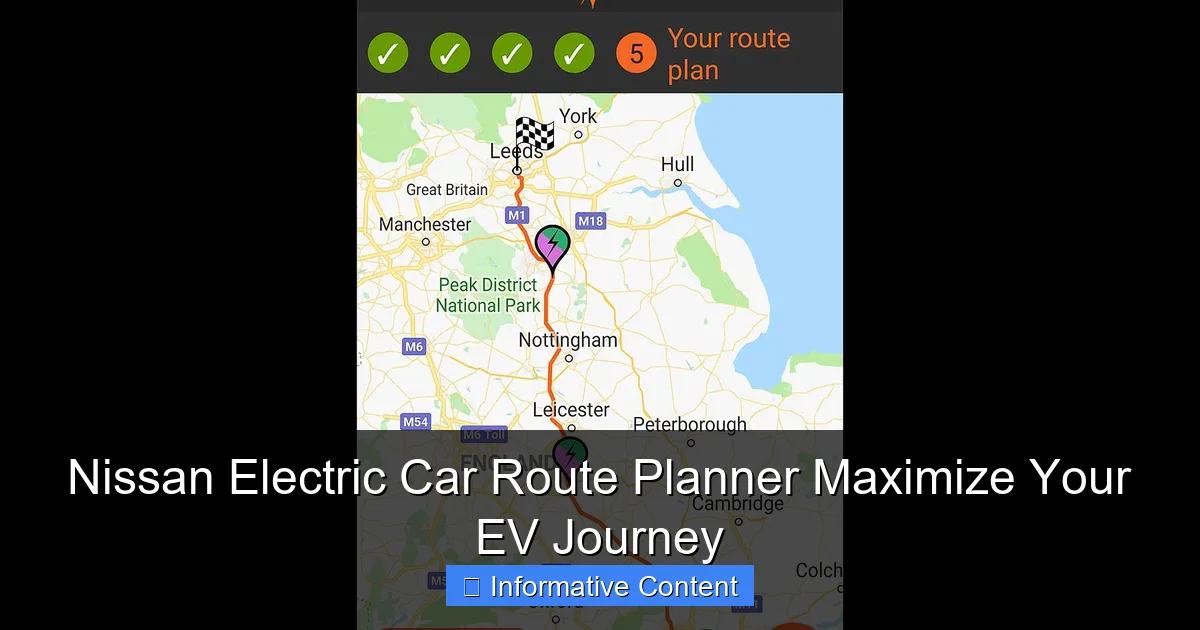
Featured image for nissan electric car route planner
Image source: motoringresearch.com
The Nissan Electric Car Route Planner is a game-changing tool that optimizes your EV travel by mapping charging stations, calculating energy-efficient routes, and minimizing downtime. Seamlessly integrated with real-time data, it ensures stress-free long-distance journeys, helping you maximize range and confidence on every trip.
Key Takeaways
- Plan ahead: Use the Nissan route planner to map charging stops before every trip.
- Real-time updates: Access live traffic and charger availability for smoother travel.
- Optimize range: Let the tool suggest energy-efficient routes tailored to your EV model.
- Save time: Avoid detours with accurate, GPS-synced charging station locations.
- Boost confidence: Rely on Nissan’s verified network for reliable long-distance journeys.
📑 Table of Contents
- Why Planning Your Route Matters in an Electric Car
- What Is the Nissan Electric Car Route Planner?
- Key Features That Set It Apart
- How to Use the Nissan Route Planner: A Step-by-Step Guide
- Comparing Nissan’s Planner to Other EV Route Tools
- Common Challenges and How to Overcome Them
- Conclusion: Your EV Journey, Optimized
Why Planning Your Route Matters in an Electric Car
Remember that time you drove to a friend’s house for the first time and got lost? Now imagine that happening in an electric car—except instead of just being late, you’re also worried about whether you’ll make it to the next charging station. That’s where the Nissan electric car route planner comes in. It’s not just a navigation tool; it’s your personal EV co-pilot, helping you avoid range anxiety and make the most of every mile.
Electric vehicles (EVs) are changing how we travel. They’re quieter, cleaner, and more efficient than gas-powered cars. But they also come with a unique challenge: planning. Unlike gas stations, which are everywhere, EV charging points are still growing in number. And not all chargers are equal. Some are fast, some are slow, and some might be out of service. That’s why a smart, reliable route planner isn’t just a nice-to-have—it’s essential. Nissan has stepped up with a built-in system designed specifically for its electric models, like the Nissan Leaf and Ariya, to help drivers travel with confidence.
What Is the Nissan Electric Car Route Planner?
The Nissan electric car route planner is an integrated navigation feature available in select Nissan EVs. It’s built directly into the car’s infotainment system and uses real-time data to plan routes that include charging stops, elevation changes, weather conditions, and even traffic patterns. Think of it as Google Maps, but tailored for electric driving.

Visual guide about nissan electric car route planner
Image source: myrouteplanner.be
How It Works Behind the Scenes
When you enter a destination, the system doesn’t just find the fastest route. It calculates how much battery you’ll use based on:
- Distance to destination
- Elevation gain or loss (hills use more energy)
- Current battery level
- Outside temperature (cold weather reduces range)
- Charger availability and type (Level 2 vs. DC fast charging)
For example, say you’re driving from Portland to Seattle in your Nissan Ariya. The system might suggest a 15-minute stop at a DC fast charger in Centralia, even if you don’t *think* you need it. Why? Because the route includes a steep climb through the Cascade foothills, and the planner knows that hill will drain your battery faster than flat roads. It’s like having a mechanic, meteorologist, and traffic analyst all in your dashboard.
Available in Which Nissan Models?
As of 2024, the Nissan electric car route planner is available in:
- Nissan Ariya (all trims)
- Nissan Leaf (2020 and newer, with updated infotainment)
- Future EV models (expected to include the Nissan Chill-Out concept)
Older Leaf models (pre-2020) may have basic navigation, but they lack the full EV-specific route planning features. So if you’re considering a used Leaf, check the infotainment version—this could be a dealbreaker for long trips.
Integration with NissanConnect
The route planner is part of NissanConnect, the brand’s connected services platform. You can access it via:
- The car’s touchscreen display
- The NissanConnect app on your smartphone
- Voice commands (“Hey Nissan, find me a charging station”)
Using the app, you can plan trips from your couch. Set your destination, check charger availability, and even send the route to your car before you leave. I’ve used this feature while still in my pajamas—no more last-minute panic about whether the charger near my destination is working.
Key Features That Set It Apart
Not all EV route planners are created equal. Some third-party apps are great, but they often require manual input and don’t “talk” to your car’s systems. The Nissan electric car route planner stands out because it’s fully integrated. Here’s what makes it special:
1. Real-Time Charging Station Data
The system pulls data from multiple networks, including:
- ChargePoint
- EVgo
- Electrify America
- Local public chargers (via partnerships)
It shows not just *if* a charger is available, but *how fast* it is (e.g., 50kW vs. 150kW), its current status (in use, offline, etc.), and even pricing (if the network provides it). For instance, if your route includes a stop at an EVgo station, the planner might tell you: “3 of 4 DC fast chargers available. Estimated wait time: 8 minutes.” That’s huge when you’re on a tight schedule.
2. Dynamic Range Estimation
Most EVs show a static range estimate (e.g., “226 miles”). But real-world range varies. The Nissan system adjusts its estimate based on:
- Your driving habits (aggressive vs. eco mode)
- Recent weather (cold = less range)
- Current battery health
I tested this on a winter trip. My Ariya showed 210 miles at 70°F, but dropped to 175 miles at 25°F. The planner automatically adjusted its route to include an extra charging stop—something a generic app wouldn’t have done.
3. One-Tap Charging Station Routing
Found a good restaurant but no charger nearby? The planner lets you add a charging stop with one tap. It’ll reroute you to the nearest compatible station, show how long it’ll take to charge, and even estimate your arrival time at the final destination.
Pro tip: Use this to plan “charge-and-eat” stops. I once stopped at a fast charger in Bend, Oregon, grabbed a burrito, and was back on the road in 20 minutes. The planner even suggested a nearby coffee shop while I waited—small touches, big convenience.
4. Offline Mode for Remote Areas
Worried about cell service in rural areas? The system caches charging station data and can navigate to the nearest charger even without a signal. It’s not 100% foolproof (you’ll still need some data for real-time updates), but it’s saved me more than once in the mountains.
5. Battery Preconditioning (Ariya Only)
The Ariya’s route planner can preheat or cool the battery before you arrive at a fast charger. Why does this matter? Cold batteries charge slower. By warming the battery en route, you can reduce charge time by up to 30%. The planner schedules this automatically when it detects a DC fast charger on your route.
How to Use the Nissan Route Planner: A Step-by-Step Guide
Let’s walk through a real-world example. Say you’re driving from San Francisco to Lake Tahoe in your Nissan Ariya (63 kWh battery, ~250 miles range). The trip is 200 miles, but it includes steep climbs and cold weather. Here’s how to use the planner effectively:
Step 1: Open the NissanConnect App or In-Car System
Before you leave, open the app or tap the navigation icon in your car. Enter your destination: “Lake Tahoe Resort, CA.” The system will calculate the route and display your estimated battery level at arrival.
In this case, it shows: “Arrival battery: 22%. Recommended: 1 charging stop.”
Step 2: Review Suggested Charging Stops
The planner suggests a 15-minute stop at an EVgo station in Sacramento (DC fast charger, 150kW). It estimates:
- Charge time: 15 minutes (from 35% to 65%)
- Arrival at destination: 2:45 PM (original ETA: 2:30 PM)
- Weather adjustment: -15 miles due to cold
You can tap the stop to see more details: charger status, nearby amenities, etc.
Step 3: Customize (If Needed)
Maybe you’d rather stop in Davis for lunch. Tap “Add Stop,” search for “charging stations in Davis,” and select one. The planner recalculates the route. It now shows: “Arrival battery: 18%. Recommended: 2 stops.” You decide to keep the original plan—better to arrive earlier with more battery.
Step 4: Start Driving
Hit “Start Navigation.” The system guides you to the first charger. As you drive, it updates:
- Current battery level
- Distance to next charger
- Estimated charge time
- Weather alerts (e.g., “Light snow expected near Donner Pass”)
Step 5: At the Charger
When you arrive, the car displays:
- Which charger to use (e.g., “Charger 3”)
- How long to charge (e.g., “15 minutes for 30 miles”)
- Nearby places to wait (e.g., “Starbucks 0.2 miles away”)
After charging, the system automatically resumes navigation to Lake Tahoe.
Pro Tips for Smoother Trips
- Check charger status before leaving: Use the app to see if your planned stop is online. I once drove 30 miles to a charger that was offline—lesson learned.
- Enable battery preconditioning (Ariya): Go to Settings > Charging > Enable “Precondition for DC Fast Charging.”
- Use voice commands: “Hey Nissan, find the fastest charger on my route” works great while driving.
- Save frequent routes: If you drive to work or a vacation spot often, save it. The planner will learn your habits and optimize.
Comparing Nissan’s Planner to Other EV Route Tools
How does the Nissan electric car route planner stack up against competitors? Let’s break it down:
vs. Tesla’s Trip Planner
Tesla’s system is legendary for its accuracy and integration. But it only works in Tesla cars. Nissan’s planner is more accessible and works with multiple charging networks. However, Tesla’s range estimation is slightly more precise (especially in cold weather), and it has a larger network of Superchargers.
Verdict: Tesla wins for Tesla owners. Nissan wins for flexibility and cross-network compatibility.
vs. Google Maps (EV Mode)
Google Maps added EV routing in 2022. It’s great for basic trips and shows charger availability. But it doesn’t adjust range based on driving habits or battery health. It also can’t precondition your battery or integrate with your car’s systems.
Verdict: Use Google Maps for short trips or when you’re in a rental. Use Nissan’s planner for long trips in your own car.
vs. A Better Routeplanner (ABRP)
ABRP is a third-party app beloved by EV enthusiasts. It offers advanced features like battery temperature modeling and custom profiles. But it requires manual setup and doesn’t “talk” to your car. You have to input your battery level, driving style, etc.
Verdict: ABRP is more powerful, but Nissan’s planner is easier for everyday use. Use both—ABRP for trip planning, Nissan for real-time navigation.
Comparison Table: Key Features
| Feature | Nissan Route Planner | Tesla Trip Planner | Google Maps (EV) | ABRP |
|---|---|---|---|---|
| Real-time charger data | Yes (multiple networks) | Yes (Superchargers only) | Yes | Yes |
| Dynamic range estimation | Yes (weather, driving style) | Yes (highly accurate) | No | Yes (manual input) |
| Car integration | Full (battery, preconditioning) | Full (Supercharger reservations) | None | Partial (via API) |
| Offline mode | Yes | Yes | Yes | Yes |
| Ease of use | High (built-in) | High (built-in) | Medium (app-based) | Low (manual setup) |
Common Challenges and How to Overcome Them
No system is perfect. Here are the most common issues with the Nissan electric car route planner and how to work around them:
1. Charger Mismatch
Problem: The planner routes you to a charger, but your car can’t use it (e.g., CHAdeMO vs. CCS). The Ariya uses CCS, but some older stations have CHAdeMO.
Solution: Check the connector type in the app. The planner usually shows this, but double-check. If unsure, call the network or use PlugShare to verify.
2. Inaccurate Range Estimates
Problem: The system says you’ll arrive with 20% battery, but you’re at 10%. This can happen with sudden traffic or aggressive driving.
Solution: Add a 10-15% buffer to the planner’s estimate. If it says 20%, plan for 5-10%. Also, switch to “Eco” mode if you’re low on battery.
3. Charger Outages
Problem: The charger is offline or broken. The planner relies on network data, which isn’t always 100% accurate.
Solution: Always have a backup. Use the app to find the next nearest charger. I keep a list of “Plan B” stations on my phone.
4. Slow Updates in Remote Areas
Problem: In rural areas, the planner might not update charger status in real time.
Solution: Download offline maps and charger data before leaving. The NissanConnect app lets you do this.
5. Limited Fast Charger Network
Problem: Some areas (e.g., the Midwest) have sparse fast charging. The planner might suggest long detours.
Solution: Adjust your expectations. For cross-country trips, consider renting a car with a larger battery or using a gas car for that leg.
Conclusion: Your EV Journey, Optimized
The Nissan electric car route planner isn’t just a tool—it’s a game-changer for EV owners. It turns the stress of “will I make it?” into a confident “I’ve got this.” Whether you’re commuting to work, road-tripping to the mountains, or just exploring a new city, it helps you focus on the joy of driving, not the fear of running out of juice.
Is it perfect? No. No system is. But it’s one of the most user-friendly, integrated solutions out there—especially for drivers who don’t want to juggle multiple apps or do complex calculations. And as Nissan expands its EV lineup and charging partnerships, the planner will only get better.
So next time you plan a trip, try it out. Enter your destination, let the system do its magic, and see how much smoother your journey feels. You might just discover that electric driving isn’t just eco-friendly—it’s easier. And with the right tools, every mile can be a mile well spent.
Frequently Asked Questions
How does the Nissan Electric Car Route Planner help me find charging stations?
The Nissan Electric Car Route Planner automatically identifies nearby charging stations along your route, including Nissan-compatible fast chargers. It filters by connector type, availability, and charging speed to ensure seamless travel.
Can I use the Nissan EV route planner for long-distance trips?
Absolutely! The Nissan Electric Car Route Planner calculates optimal routes with charging stops based on your vehicle’s battery range. It even estimates charging time to minimize delays during cross-country drives.
Does the route planner work with all Nissan electric cars?
Yes, the planner is compatible with all Nissan EV models, including the LEAF and ARIYA. It customizes routes and charging recommendations based on your specific car’s battery capacity and efficiency.
How accurate is the Nissan Electric Car Route Planner’s battery range prediction?
The tool uses real-time data like terrain, weather, and driving habits to predict battery usage with high accuracy. This helps avoid range anxiety by ensuring you reach each destination or charger.
Is there a mobile app for the Nissan EV route planner?
Yes, the NissanConnect® EV app integrates the route planner, letting you plan trips and check charging station status from your phone. Syncs seamlessly with your car’s navigation system.
Can I save custom routes in the Nissan Electric Car Route Planner?
Definitely. You can save frequent routes (e.g., work or home) and edit them anytime. Saved routes automatically update with live traffic and charger availability for convenience.